conky / cores
View on GitHub

Conky widget · Lua + Cairo

Per-core CPU detail,
drawn like glass.

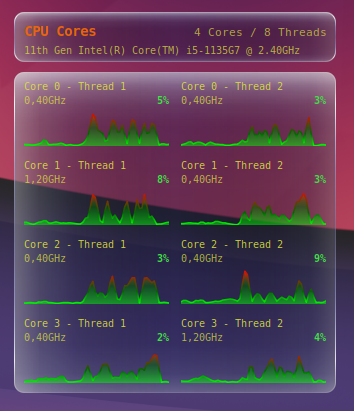
conky-cores detects both logical CPUs and physical cores, groups SMT threads, and shows each core with a rolling graph, the current load, and the current frequency in a translucent liquid-glass style.
Linux Lua + Cairo nproc / /proc/cpuinfo Wayland & X11
conky-cores widget showing per-core CPU cards with a glass-like dark theme

01 — What it shows

One compact box per core

Each core cell includes a tiny graph, the current workload, and the current clock speed, arranged automatically based on the CPUs detected at startup.

SMT-aware

The widget uses nproc and lscpu to detect logical CPUs, physical cores, and thread grouping.

Physical-core labels

Threads are grouped by physical core and shown as “Core X” or “Core X - Thread Y” instead of treating every CPU as a separate core.

Live readouts

Each cell shows a rolling graph, the current load percentage, and the current frequency in GHz.

Flexible layout

Rows, spacing, vertical alignment, and a debug canvas overlay are all configurable from the Lua settings.

02 — Requirements

What it needs

Conky with Lua and Cairo support is the main requirement, plus the standard Linux tools that expose CPU information.

RequirementWhy
ConkyRuns the widget and renders the window.
Lua + CairoDraws the glass panels, text, and graphs.
nprocDetects the number of logical CPUs to display.
lscpuImproves physical-core detection and the header readout for “Cores / Threads”.
/proc/cpuinfoProvides the CPU model shown in the header.

03 — Install

Start it from this folder

01

Clone or open the repo

git clone https://github.com/wim66/conky-cores.git
cd conky-cores
02

Launch Conky

./autostart.sh

Or launch it directly with conky -c ./conky.conf.

03

Tune the position

If needed, adjust the window placement and size in conky.conf so the widget fits your desktop layout.

04 — Configuration

Adjust the widget

Most tweaks live in the CFG table near the top of widget.lua.

Core layout

SettingDefaultPurpose
cores_per_row2Changes how many core boxes appear next to each other before wrapping to the next row.
graph_history_length60Controls how many samples are kept in the rolling graph history.
vertical_align"top"Lets you align the content block at the top, middle, or at a fixed pixel value.
debug_show_canvasfalseShows a canvas-size overlay that helps tune the window height.

Appearance

SettingDefaultPurpose
glass_base_color0x08081ASets the base tint of the glass panels.
glass_base_alpha0.35Adjusts the opacity of the background layer.
colors.text0xDCE142Changes the text color used for the core information.
corner_radius10Tunes how rounded the card corners appear.