wim66 / conky-system-redone-v2
View on GitHub

Conky widget · Lua + Cairo

A system monitor,
drawn like glass.

conky-system-redone-v2 rebuilds the classic text-based conky-system.conf in Lua and Cairo. Every panel — CPU, memory, storage, network, fans, processes, updates — is hand-drawn on a Cairo surface with a soft, translucent finish instead of Conky's stock rendering.
Arch Linux KDE Plasma Wayland & X11 Lua 5.1 / 5.3+
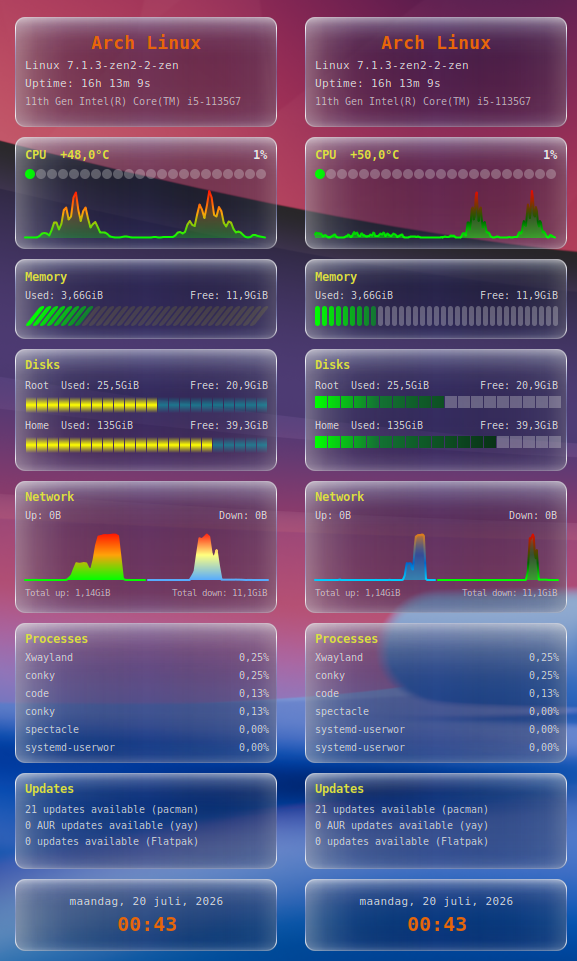
conky-system-redone-v2 widget showing system, CPU, memory, storage, network, processes, updates and clock panels with a glass-like dark theme

01 — Style

Two looks for bars & graphs

Swap the visual style of the bars and graphs layer without touching any layout code — just a config line.

scripts/bars.lua · scripts/bars2.lua

CPU load, memory %, and filesystem usage rendered as bars. Two variants, same data.

bars_module = "bars2", -- "bars" or "bars2"

scripts/graphs.lua · scripts/graphs2.lua

CPU load and network up/down history rendered as line graphs. Two variants, same data.

graphs_module = "graphs2", -- "graphs" or "graphs2"

02 — Requirements

What it needs

Conky with Lua + Cairo is the only hard requirement. Everything else degrades gracefully if missing.

ToolUsed for
lsb_releaseDistro name
pacman / checkupdatesUpdate count (Arch, via pacman-contrib)
aptUpdate count (Debian/Ubuntu)
yay / paruAUR update count
flatpakFlatpak update count

03 — Install

Get it running

01

Clone the repo

git clone https://github.com/wim66/conky-system-redone-v2.git
cd conky-system-redone-v2
02

Set your network interface

Open widget.lua and set network_iface to yours (find it with ip link or nmcli device).

03

Start it

conky -c conky.conf

Or use autostart.sh, which stops any running conky cleanly before relaunching — add it to your desktop environment's autostart.

04 — Configuration

Configuring the widget

Everything lives in the CFG table near the top of widget.lua — no other file needs editing for normal tweaks.

General

KeyDefaultDescription
network_iface"enp0s31f6"Interface used for the Network panel. Find yours with ip -o link show.
bars_module"bars2"Which bars style to load from scripts/: "bars" or "bars2".
graphs_module"graphs2"Which graphs style to load from scripts/: "graphs" or "graphs2".

Updates

KeyDefaultDescription
aur_helper"yay"AUR helper for the extra Updates line. Set to "paru", or "" to disable AUR checking entirely.
show_flatpak_updatesfalseAdds a Flatpak update count. Safe to leave on even without Flatpak — skipped automatically if the flatpak binary isn't found. Involves a flatpak update --appstream metadata refresh every 30 minutes.

Panels

KeyDefaultDescription
show_fansfalseShows the Fans panel (RPM per fan, via scripts/getfans.lua). Set to false to hide it entirely — no empty box is left behind.
show_datetimetrueShows the Date & time panel. Independent of show_fans — toggle each on/off separately.